Product Classification Schema: Boost E-Commerce SEO
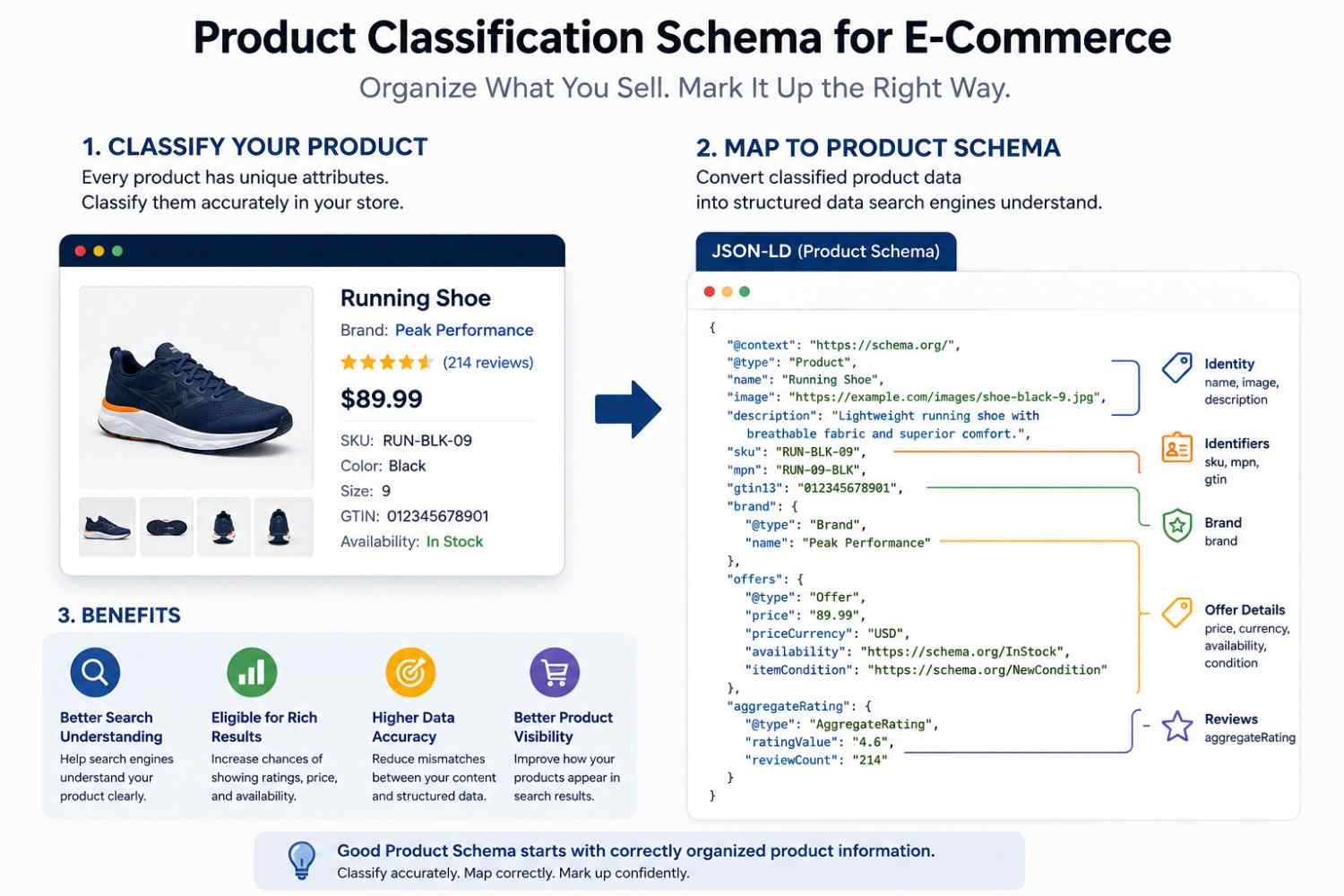
Most Product Schema errors don't start in the code. They start earlier—when product information is poorly organized, inconsistently labeled, or not fully understood— before structured data is generated. Getting Product Schema right in e-commerce depends on one thing that often gets skipped: correctly classifying what each product actually is before any markup is written.
Product Classification vs. Product Schema: Why the Difference Matters
Product classification is how your store organizes and describes its inventory internally. Product Schema is how you communicate that information to search engines through structured data.
These are related, but not the same, and confusing them leads to inaccurate markup.
Consider an online shoe store. Internally, they might group products into broad categories such as "Men's Athletic Footwear." But a search engine processing their Product Schema needs something more specific: a defined product entity with a name, brand, SKU, price, availability, and identifiers that distinguish one item from another.
If the store marks up a category page as a Product entity, or applies one schema block to a group of related shoes with different prices and SKUs, the structured data misrepresents what's actually on the page. Search engines evaluate Product Schema against the visible page content — and mismatches create data quality problems that affect how that markup is processed.
How E-Commerce Products Are Actually Classified
Before structured data enters the picture, a product in an e-commerce system is typically defined by a set of attributes that distinguish it from everything else in the catalog:
- Product type — what category of item it belongs to
- Brand — who manufactures or produces it
- Model — the specific product line or version
- Variant — size, color, configuration, or other distinguishing option
- SKU — the store's internal identifier for that specific item
- GTIN — a global trade item number (barcode identifier)
- MPN — the manufacturer part number
- Condition — new, used, refurbished
- Availability — in stock, out of stock, pre-order
- Price — current selling price and currency
- Material, color, size — physical or configurable attributes
In a catalog with thousands of products, these attributes are what separate one item from another. They're also exactly what Product Schema is designed to communicate. For e-commerce businesses looking to strengthen their overall digital presence, WebSensePro offers SEO and web solutions that complement a well-structured product data strategy.
Turning Product Classification Into Structured Data
Once a product's attributes are clearly defined, mapping them to Schema.org Product properties is a logical process:
| E-Commerce Attribute | Schema.org Property |
|---|---|
| Product title | name |
| Product images | image |
| Product description | description |
| SKU | sku |
| Manufacturer part number | mpn |
| Global Trade Item Number | gtin / gtin13 / gtin12 |
| Brand | brand → Organization or Brand |
| Selling information | offers → Offer |
| Price | price + priceCurrency |
| Stock status | availability |
| Reviews | aggregateRating |
designed to reflect real product data — not approximate it. Each property should correspond to information that's actually present and visible on the product page. Marking up a price that doesn't appear on the page, or a rating that isn't displayed to shoppers, creates a disconnect between the structured data and the page content.
Product Variants Create a Classification Challenge
Variants are where Product Schema gets genuinely complicated—and where classification decisions directly impact markup accuracy.
Take a running shoe listed in three colors and six sizes. In the product catalog, this might be managed as a single parent product with 18 variant combinations. Each variant has its own:
- SKU (e.g., RUN-BLK-09, RUN-BLK-10, RUN-RED-09)
- Price (which may vary by size or configuration)
- Availability (some sizes may be out of stock)
- GTIN (each variant typically has its own barcode)
A realistic variant example:
Running Shoe → Black → Size 9 → SKU: RUN-BLK-09 → GTIN: 012345678901 → $89.99 → In Stock
If the product page displays this specific variant's information when a user selects those options, the schema on that page should reflect the variant — not the parent product's generic information. Applying a single schema block with one price and SKU to a page that actually shows different prices and availability states for different selections produces structured data that doesn't accurately represent the page.
For stores with complex variant structures, each variant URL that displays unique product information should have schema that corresponds to that specific variant's data.
Classification Errors That Can Lead to Bad Product Schema
These aren't abstract schema mistakes — they're specifically the result of classification problems upstream:
- Wrong product type assigned — marking up a bundle or kit with the same schema as a single-unit product
- Combining multiple products under one Product entity — grouping distinct products that have different SKUs, prices, or identifiers into a single schema block
- Confusing a product with a product category — applying Product schema to a collection or listing page rather than an individual item page
- Reusing the same SKU across different products — which creates identifier conflicts in the structured data
- Associating the wrong brand — particularly common with resellers or multi-brand catalogs
- Outdated availability — marking items as in stock when inventory has changed
- One price applied to variants with different prices — misrepresenting what shoppers actually see
- Mixing parent and variant data — using the parent product's generic name with a variant-level SKU and price
- Marking up information not visible on the page — schema should reflect what's actually presented to the user
None of these errors necessarily produce an immediate ranking drop, but they do affect data quality, rich result eligibility, and how accurately the product is understood and represented in search.
What Product Information Should Be Classified Before Creating Schema?
Before generating any Product Schema, work through this checklist for each product page:
- What exactly is being sold on this page? Single product, variant, bundle, or kit?
- Is this a parent product page or a variant-specific page?
- What uniquely identifies this product? SKU, GTIN, MPN — which are available?
- Which brand manufactures this product? Is that brand displayed on the page?
- What is the current price? Is it displayed in a single currency?
- Is it currently in stock? What's the accurate availability state?
- Are there reviews or ratings? Are they shown to users on this page?
- Does every piece of information in the schema appear visibly on the page?
If any of these questions can't be answered with certainty, the structured data can't be generated accurately, regardless of which tool is used to produce it.
Example of a Classified Product Becoming a Product Schema
Classified product information:
- Name: Wireless Noise-Cancelling Headphones
- Brand: Example Audio
- SKU: ANC-500-BLK
- GTIN: 0123456789012
- MPN: ANC500BLK
- Color: Black
- Condition: New
- Price: $149.00 USD
- Availability: In Stock
- Rated 4.6 out of 5 from 214 customer reviews.
This product is well-classified. Every attribute is defined, unambiguous, and specific to this exact item. Translating it into Product Schema structured data (JSON-LD) is straightforward because there's no ambiguity about what the product is, who makes it, what it costs, and whether it's available.
The schema would include a Product entity with nested Offer (containing price, currency, and availability), Brand, identifiers (sku, mpn, gtin13), and AggregateRating. Each property maps directly to visible page content.
Contrast this with a product page where the price varies by color selection, the availability isn't shown until a size is chosen, and the SKU isn't displayed to users. Generating a schema in that situation requires resolving those classification questions first — otherwise, the markup either omits key properties or fills them inaccurately.
Using a Product Schema Generator After Classification
A schema generator is most effective as the last step in the process — not the first.
When product information is already correctly classified and organized, a generator efficiently converts it into valid structured markup. When the underlying data is incomplete or inconsistent, a generator can only produce markup that reflects those problems.
The SEO Schema Markup Product Schema Generator is built to support this workflow. Once you've identified the correct product name, brand, identifiers, price, availability, and other attributes for a specific page, the generator helps translate that organized information into properly formatted JSON-LD ready for implementation. For WordPress-based e-commerce stores, Free WordPress MCP provides tools to manage and implement structured data directly within WordPress using AI (Artificial Intelligence).
Final Takeaway
Accurate Product Schema is a data organization problem before it's a technical one. Search engines process structured data against what's actually on the page — so the markup is only as good as the product information behind it.
Before generating a schema for any product page, clearly classify the product: what it is, what uniquely identifies it, how its variants differ, and which attributes are actually visible to shoppers. That groundwork is what makes structured data useful. If you'd like to see how this classification-to-schema process works in practice, this step-by-step walkthrough covers it in detail.
When your product information is ready, use the SEO Schema Markup Product Schema Generator to efficiently convert it into structured markup.