Author Schema: What It Is, Why It Matters, and How to Use It
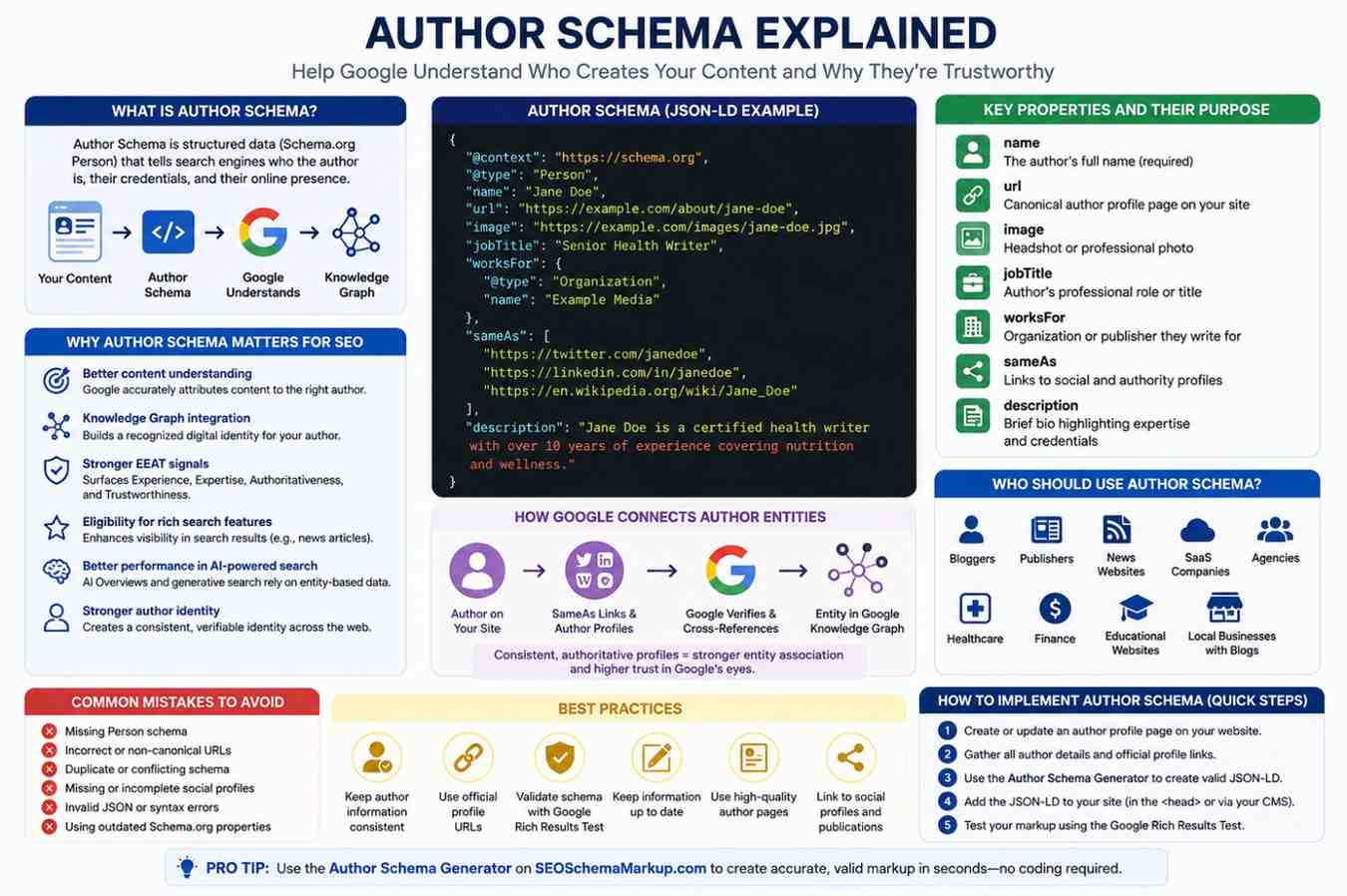
Every piece of content published online has an author, but Google can't always figure out who that author is or whether they're trustworthy. That's where Author Schema comes in. If you're serious about SEO in 2026, understanding author structured data isn't optional. It's one of the clearest ways to tell search engines exactly who created your content—and why they're credible.
What Is Author Schema?
Author Schema is a type of structured data markup based on Schema.org that tells search engines the identity, credentials, and context of a content author. It uses a standardized vocabulary to describe a person or organization in a machine-readable format, allowing Google to connect your author to an entity in its Knowledge Graph. Implementing it correctly helps Google understand not just what your content says, but who is saying it.
Understanding Schema.org Person
Schema.org is a collaborative vocabulary supported by Google, Bing, Yahoo, and Yandex. The Schema.org Person type is the foundation of the Author Schema. It defines a set of properties, such as name, URL, job title, and social profiles, that describe an individual in a way that search engines can parse and act on.
Structured data is code (usually written in JSON-LD format) embedded in a webpage that organizes information into a format machines understand. Instead of hoping Google infers your author's identity from plain text, structured data gives it the answer directly.
Google uses this data to build entity profiles, power rich results, and evaluate content trustworthiness as part of its broader quality assessment systems.
Why Author Schema Matters for SEO
Author Schema isn't just a technical formality. It has real, measurable implications for how your content is indexed, ranked, and displayed.
Key benefits include:
- Better content understanding - Google can accurately attribute content to the right person, reducing ambiguity around authorship.
- Knowledge Graph integration - A well-structured author entity can be picked up by Google's Knowledge Graph, giving your author a recognized digital identity.
- Stronger EEAT signals - Google's quality guidelines emphasize Experience, Expertise, Authoritativeness, and Trustworthiness. Author Schema is one of the most direct ways to surface those signals in your markup.
- Eligibility for rich search features - Certain article types (like news articles) can display author information in rich results when schema is present.
- Better performance in AI-powered search—systems like Google's AI Overviews and generative search experiences rely heavily on structured, entity-based data to attribute and surface information accurately.
- Stronger author identity across the web - By linking to social profiles and official pages, Author Schema creates a consistent, verifiable identity that builds trust with both search engines and readers.
How Author Schema Works
Key Properties of Author Schema
Author Schema is typically written in JSON-LD (JavaScript Object Notation for Linked Data)-the format Google recommends for all structured data implementations. It's placed in the <head> of your HTML and uses the @type: "Person" declaration from Schema.org.
Here's what a complete JSON-LD Author Schema looks like in practice:
{
"@context": "https://schema.org",
"@type": "Person",
"name": "Jane Doe",
"url": "https://example.com/about/jane-doe",
"image": "https://example.com/images/jane-doe.jpg",
"jobTitle": "Senior Health Writer",
"worksFor": {
"@type": "Organization",
"name": "Example Media"
},
"sameAs": [
"https://twitter.com/janedoe",
"https://linkedin.com/in/janedoe",
"https://en.wikipedia.org/wiki/Jane_Doe"
],
"description": "Jane Doe is a certified health writer with over 10 years of experience covering nutrition and wellness."
}
What each property does:
- Name - The author's full name (required)
- URL - A canonical author profile page on your site
- Image - A headshot or professional photo
- Job Title - Their professional role
- Works For - The organization or publisher they write for
- SameAs - Links to verified social and authority profiles (LinkedIn, Twitter, Wikipedia, etc.)
- Description - A brief bio summarizing expertise and credentials
How Google Connects Author Entities
Google cross-references the same URLs to verify and confirm the author's identity across the web. The more authoritative and consistent those profiles are, the stronger the entity association becomes. This is how a byline goes from being a string of text to a recognized, trusted entity in Google's semantic index.
Author Schema vs. Person Schema
| Feature | Author Schema | Person Schema |
|---|---|---|
| Primary Use | Attribute content to a creator | Describe any person (celebrity, professional, etc.) |
| Context | Inside Article or BlogPosting schema | Can be standalone or nested |
| Google Focus | Content credibility and EEAT | Entity recognition and Knowledge Graph |
| Common Properties | name, url, sameAs, jobTitle | Same, plus birthDate, affiliation, etc. |
| Required for Articles? | Recommended for news & blog content | Not always required |
In practice, Author Schema uses the Person schema type. The distinction matters because it helps you apply the right context-especially when nesting it inside Article or NewsArticle structured data.
Who Should Use Author Schema?
Author Schema isn't only for major publishers. Anyone producing content online can benefit:
- Bloggers - Establish a personal brand and build topical authority over time.
- Publishers and media outlets - Signal editorial credibility and attract rich results in Google News.
- News websites - Virtually required for Google News eligibility and Top Stories features.
- SaaS companies - Content teams can strengthen thought leadership and brand authority.
- Digital agencies - Demonstrate writer expertise to clients and search engines alike.
- Healthcare websites - especially critical for YMYL (Your Money or Your Life) content; author credentials directly affect how Google evaluates trustworthiness.
- Finance and legal sites - Same YMYL considerations apply; author markup validates professional credentials.
- Educational websites - Help associate instructors and subject experts with course and article content.
- Local businesses with blogs - Even a local company blog benefits from associating content with a named, credentialed author.
WordPress users publishing content at scale should also note that managing schema across a large site is far easier when your workflow is streamlined. Tools like the WordPress MCP Server at FreeWordPressMCP.com can help integrate AI-assisted publishing and content management workflows directly with your WordPress site, reducing the manual overhead of implementing structured data across hundreds of posts.
Common Mistakes to Avoid
A poorly implemented Author Schema can be worse than none at all if it causes validation errors or sends conflicting signals to Google.
Avoid these common pitfalls:
- Missing Person schema entirely - Many sites add Article schema without nesting a proper @type: "Person" block for the author.
- Incorrect or broken URLs - The url and sameAs fields must point to live, accessible pages. Broken links invalidate the entity connection.
- Duplicate schema blocks - Adding multiple conflicting Author Schema entries on the same page confuses crawlers.
- Missing social profiles - Omitting the sameAs links weakens entity recognition and leaves Google without verification anchors.
- Invalid JSON syntax - A misplaced comma or missing bracket will cause the entire schema block to fail silently.
- Using outdated Schema.org properties - Schema.org evolves. Properties that were valid two years ago may now be deprecated or renamed. Always reference the current Schema.org Person documentation.
- Inconsistent author information - If your markup says "Jane Doe" but your byline says "J. Doe" and your LinkedIn says "Jane M. Google relies on consistent author information, so using different name formats across your site can weaken author recognition.
If your site has accumulated schema errors over time or you're unsure whether your structured data implementation is sound, it's worth getting a structured data audit from a qualified team. Agencies specializing in technical SEO services, like WebSensePro, can identify implementation gaps, fix invalid markup, and ensure your schema strategy aligns with current Google guidelines—particularly important for YMYL sites, where errors carry real ranking risk.
How to Generate Author Schema Easily
Writing valid JSON-LD from scratch takes practice, and a single syntax error can silently break your entire schema block. Rather than building author markup by hand, you can use the Author Schema Generator on SEOSchemaMarkup.com to generate valid, ready-to-use JSON-LD in seconds—no coding required.
The tool walks you through each property: name, job title, profile URL, headshot, bio, and same-as social links. Once you fill in the fields, it outputs clean, properly formatted markup you can copy directly into your site's <head> or your CMS's schema field.
If you're unsure where to place the generated code, watch this step-by-step tutorial on YouTube: How to Add Schema Markup_
Once you have the output, validate it using the Google Rich Results Test to confirm everything is parsing correctly before you publish.
If you manage a multi-author publication, this approach also brings consistency—every author's structured data follows the same format, reducing the risk of conflicting or incomplete markup across your site.
How to Implement Author Schema: Step-by-Step
- Create a dedicated author page on your website (e.g., /about/jane-doe/).
- Gather author details: full name, job title, bio, headshot URL, employer, and social profile URLs.
- Generate your JSON-LD markup using the Author Schema Generator.
- Paste the markup into the <head> section of each article page, or use a CMS plugin to add it automatically.
- Nest it inside your Article schema using the "author" property to connect the two blocks.
- Validate using the Google Rich Results Test to check for errors or warnings.
- Monitor in Google Search Console under the Enhancements tab to track how your schema is being processed.
Best Practices for Author Schema
Use these best practices to ensure your author structured data is accurate, consistent, and effective.
- Keep author information consistent across your website, social profiles, and any external publications.
- Use official, canonical profile URLs for both your site and third-party platforms.
- Validate every schema implementation before publishing, using Google's Rich Results Test or Schema.org's validator.
- Keep information up to date - if an author changes job titles or social handles, update the schema accordingly.
- Build high-quality author pages with a full bio, credentials, headshot, and links to published work.
- Links to authoritative social profiles - LinkedIn, Twitter/X, and Wikipedia (if applicable) - carry the most weight in Google's entity graph.
- Nest the Author Schema inside the Article Schema whenever possible for maximum contextual benefit.
- Avoid using organizational accounts as author entities when a named person wrote the content—Google prefers Person-level attribution for editorial content.
Frequently Asked Questions
What is Author Schema?
Author Schema is structured data markup using the Schema.org Person type to identify and describe the author of a web page or article. It tells search engines the author's name, credentials, and online presence in a machine-readable format.
Does Author Schema improve rankings?
Author Schema is not a direct ranking factor, but it strengthens EEAT signals that influence how Google evaluates content quality. It also makes content eligible for certain rich results and improves how Google attributes and understands your content-both of which can positively affect visibility over time.
How do I test Author Schema?
Use the Google Rich Results Test (search.google.com/test/rich-results) or the Schema Markup Validator (validator.schema.org) to paste your markup and check for errors, warnings, and valid detected entities.
Is Author Schema required?
It's not technically required, but it's strongly recommended—especially for news articles, health content, finance content, and any YMYL pages where author credentials directly affect how Google assesses trustworthiness.
Can I use JSON-LD for Author Schema?
Yes, and Google specifically recommends JSON-LD as the preferred format for structured data, including Author Schema. It's easier to implement and maintain than Microdata or RDFa because it lives in a single script block and doesn't require changes to your HTML markup.
Conclusion
Author Schema is one of the most underused tools in modern SEO and one of the most impactful for sites where credibility matters. By implementing structured data that clearly identifies your authors, you give Google the entity-level signals it needs to understand and trust your content.
The good news is you don't need to write JSON-LD by hand. Generate Author Schema using a dedicated tool, validate your output with Google's Rich Results Test, keep your author profiles current, and you'll have a solid foundation for communicating expertise and trustworthiness at scale. Get it right once, and it works quietly in the background every time your content appears in Google Search.